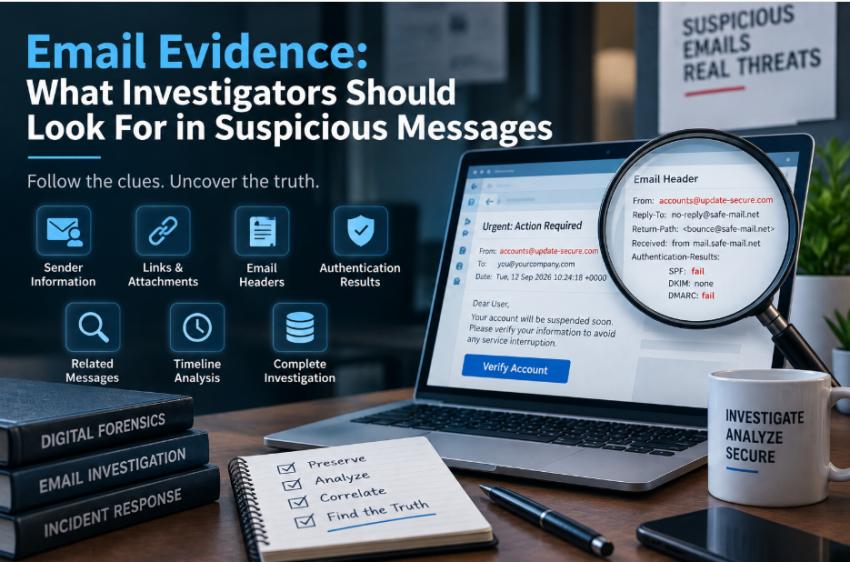
Email investigations are no longer limited to checking whether a message looks genuine. Modern emails can contain valuable technical information that helps security teams understand where a message came from, how it was delivered, and whether it is connected to other suspicious activity.
For organizations dealing with phishing, fraud, impersonation, or internal security incidents, examining this information can provide a clearer picture of what happened. A structured approach also helps prevent investigators from reaching conclusions based on a single unusual detail.
Why Email Evidence Matters
An email contains more information than what appears in the inbox. The message body, sender information, headers, attachments, links, timestamps, and authentication results can all contribute to an investigation.
For example, an employee may receive an email that appears to come from a company executive requesting an urgent payment. The message itself may look convincing, but technical details could reveal a different Reply-To address, an unexpected sending server, or a link leading to an unrelated domain.
Looking at these elements together provides more context than simply judging the writing style of the message.
Begin With the Original Message
The first priority should be preserving the original email. Avoid deleting the message or modifying it unnecessarily. If the email is part of a formal investigation, retaining the original data can be important for later analysis and documentation.
Screenshots can help document what a user saw, but they may not contain all of the technical information available in the original message.
It is also important to avoid interacting with suspicious content during the initial review. Unexpected links should not be clicked, and unknown attachments should not be opened on a normal workstation just for testing.
Review Sender Information
The sender's display name is not enough to establish who actually sent an email. Investigators should examine the complete address and domain associated with the message.
Pay attention to domains that resemble legitimate organizations but contain subtle differences. Attackers may use additional characters, alternate spellings, or unrelated domains to make an address appear familiar.
The Reply-To field should also be reviewed. A different Reply-To address may have a legitimate explanation, but when it appears alongside other inconsistencies, it becomes relevant evidence.
The key is to treat these details as clues rather than immediate proof of malicious activity.
Analyze the Message Request
The purpose of an email can reveal important context. Ask what the recipient is being asked to do and whether that request is normal.
Common areas that deserve attention include requests to:
Transfer money
Change payment information
Provide login credentials
Share confidential documents
Download an unexpected file
Verify an account through an unfamiliar website
An unusual sense of urgency can also be significant. A message demanding immediate action may be designed to discourage the recipient from verifying the request through another channel.
However, urgency alone does not establish that an email is malicious. The request should be evaluated against the sender, technical information, and surrounding communications.
Inspect URLs and Attachments Safely
Links can provide valuable evidence without being opened. Examine the destination address and compare the domain with the organization mentioned in the message.
Investigators should look for unfamiliar domains, unexpected redirects, misleading subdomains, or URLs that do not fit the context of the email.
Attachments require similar caution. Consider the filename, extension, source, and reason for delivery before taking any action. A suspicious attachment should not be opened on a production computer simply to determine what it contains.
For deeper analysis, organizations should use controlled environments and appropriate security procedures.
Understand Email Headers
Headers contain technical fields that are not normally visible in the standard email view. They can provide useful information about message routing, identification, and authentication.
Important fields may include From, Reply-To, Return-Path, Received, Message-ID, and Authentication-Results.
Received entries can help establish the systems involved in delivering the message. Message-ID values may assist in finding related copies or communications. Comparing multiple headers can also expose inconsistencies between what the email claims and what the technical information indicates.
Header analysis should still be interpreted carefully because email delivery can involve multiple servers, relays, and security systems.
Consider SPF, DKIM, and DMARC
Email authentication mechanisms can add another layer of evidence.
SPF provides information about whether a sending host is authorized for a relevant domain. DKIM uses a cryptographic signature associated with a domain, while DMARC evaluates authentication results and domain alignment.
These mechanisms can help investigators understand how a message was authenticated, but they should not be treated as an automatic indicator that an email is completely safe.
Authentication results become more useful when they are compared with the sender address, header information, message content, links, and other evidence.
Search for Related Communications
Investigating one email in isolation may not provide enough information. Related messages can reveal patterns that are difficult to identify from a single communication.
Search for emails with similar subjects, sender domains, URLs, attachment names, timestamps, or wording. If multiple users received comparable messages, investigators may discover that the activity involved several accounts rather than one recipient.
Communication patterns can also help establish whether a suspicious message was part of a larger phishing or impersonation attempt.
This type of correlation becomes increasingly important as the amount of email data grows.
Create a Clear Timeline
A timeline can help connect separate pieces of evidence.
Record when the email was received and identify important events that occurred before and after delivery. Depending on the case, this may include related messages, recipient actions, subsequent requests, or other relevant communications.
For instance, an initial email requesting account verification followed by another message containing a payment request may have greater significance when both events are viewed together.
A timeline allows investigators to move from isolated observations toward a clearer sequence of events.
When Specialized Tools Become Useful
Reviewing one suspicious message manually may be straightforward. Larger cases can be much more demanding when they involve multiple mailboxes, thousands of messages, attachments, metadata, and communication patterns.
At this stage, investigators may need to perform repeated searches, identify related messages, examine metadata, and organize findings. Handling these tasks manually can consume significant time.
Using email forensics software can help investigators manage larger volumes of email evidence and make searching, analysis, and correlation more systematic.
A Structured Approach Reduces Mistakes
A consistent investigation process helps prevent important evidence from being overlooked. Instead of focusing immediately on one suspicious element, examine the message from several perspectives.
Start with preservation, then review the sender and request. Examine links and attachments safely, analyze technical headers, review authentication results, and compare related communications. When necessary, establish a timeline to connect the evidence.
This approach also makes it easier to document why a particular message requires further attention.
Final Thoughts
Email can contain a significant amount of information beyond the visible message. Sender details, headers, authentication results, links, attachments, timestamps, and related communications can all contribute to understanding a suspicious incident.