

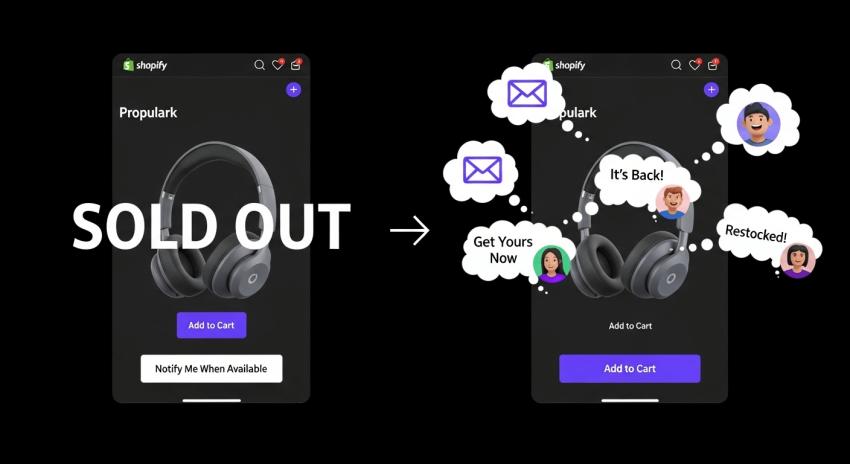
Quick Summary: from products that aren't in stock. The app adds buttons to allow a customer to be notified when a product comes back in stock. The top five apps are SB Coming Soon Product-PreSale, Notify! Back in Stock|PreOrder, Back In Stock, Notify Me: Kbite, Preorder, Back In Stock - STOQ, Preorder, Back in Stock Duck. They can notify customers via email, provide preorders, and provide buttons as a way to be notified when a product comes back in stock. Pricing starts from free plans. Each app is designed to ease an issue with stock. All you need to do is choose the app that works with your store level.
If you operate an online store, you have items that sell out quickly. When these items sell out, customers may leave your store to shop elsewhere. This means lost sales, which an app can help fix. A Back-in-Stock app will allow customers to easily apply for notifications when sold-out products come back in stock. This will ultimately give customers a reason to come back to your store.
In this article, we will review how the Shopify Back-in-Stock app works, why you need one, how to choose the right one for your store, its benefits, and finally, the top five Back-in-Stock apps in the Shopify app store that will allow customers to sign up for back-in-stock email and SMS alerts that are easy to understand and use. Our goal is to help you find the best solutions for your store's Back-in-Stock alerts.
These apps turn stockouts into more sales by sending emails or push notifications when sold-out items return! This keeps everything going strong. Let’s dive in!
What Is a Back-in-Stock App for Shopify?
A back-in-stock app is a must-have solution for Shopify stores when your products sell out. When customers navigate to a product page, they see a "Notify Me" button on the product page and can fill out their email or phone number to receive an alert when you restock. After you've restocked, it sends the customer a message automatically. This is what's called back-in-stock alerts.
Since many of these apps provide pre-order functionality, you're able to sell a product before you have it in stock; some will even provide low-stock warnings. These apps work directly with Shopify, and you don't need to be a techie to get them up and running. The key concept is really just a back-in-stock app because we're talking specifically about alerting after restock.
This ultimately solves the challenge of customers leaving your website. Instead, customers remain engaged with you and are far easier to sell to again. It's a super simple way of keeping the sales coming in.
Why Do You Need a Shopify Back-in-Stock App?
When items are out of stock, online stores lose sales. On average, 8% of products will be out of inventory. When billions of people are shopping online, that is a significant amount of missed revenue. The Back-in-Stock app on Shopify can help solve this issue by allowing customers to sign up to get notified when items are back in stock.
For instance, if a popular shirt sells out, customers have the option to request an alert when the product becomes available again. Therefore, the store restocks the product and sends a customer an email or text notifying them of the restock. Customers will return to the store and make a purchase. If items are out of stock, they will go to another store to make their purchase instead. 69% of shoppers will switch stores if near identical items are unavailable.
Back-in-Stock apps also provide valuable data on demand. Retailers can see which products have the highest number of sign-ups. Data about products with sign-ups really helps retailers manage their inventory better. A store will (or will not) overbuy products or underbuy products. It can even keep customers happy during busy times of the year, like the holiday season. It can actually increase sales by 10-20% and decrease cart abandonment.
How to Choose the Best Back-in-Stock App for Your Shopify Store?
When choosing a Back-in-Stock solution, it is important to take your time. Start with ease of use. Go find apps that are easy to install and don’t require code. You will also want an app that fits your theme.
Next, you will want to think about your app features. Do you need email alerts, SMS alerts, or pre-orders? Some offer wish lists or low-stock counters. Then think about integrations like email marketing platforms (Klaviyo, Mailchimp, etc.)
Pricing is even more crucial in the equation; a /free plan will work for the smaller stores while paid plans offer more alerts or no branding. In addition to pricing, check out the reviews to see what real users are saying. The general rule of thumb is around 4.5 stars or higher.
All of that is great, but support is super important too; you will want chat or email support from the app. Test to see if it’s mobile-friendly and if it’s secure. You will want to see if it's worth your time, give it a free trial so that at some point you have nothing to compliment yourself on.
In these ways, you will find the best app that can scale with you and your store.
Benefits of Using Back-in-Stock Alerts in Your Store
You can see many upsides to offering back-in-stock alerts. First of all, they recover lost sales. When people sign up for alerts, they are notified and come back to buy! No need for another ad campaign.
They create a better shopping experience. People feel important when they receive a notification, and they won't have to check your site every day. This creates loyalty.
The alerts create urgency. Low-stock warnings trigger immediate buys. For new launches, the alerts create buzz/urgency.
You get demand over time. Sign-up data shows items with popularity that can assist your inventory planning. You can order enough product to avoid being out of stock or having too much product that goes to waste.
During peak times like large sales events/holidays, alerts keep your business flowing. Alerts work with pre-orders, so you can capture as many sales as possible. Overall, these simple tools save you time and turn bumps in the road into speed bumps. Your store runs better, and sells more product!
1: SB Coming Soon Product-PreSale
SB Coming Soon Product-PreSale for upcoming and out-of-stock items adds badges/timers to create hype and a "Notify Me" button for customers to record their email to be notified when an item is in stock.
This app is for all Shopify store sizes and integrates with email inboxes to alert distributors. No coding is required. It also works with new themes.
How It Works
Setup is simple in the Shopify admin. You add a coming soon or countdown badge to a product. For out of stock, it says Notify Me. Customers enter their email address. When you add inventory to those products, it will notify them. You can schedule upcoming releases with dates in mind. The changes are also previewed live.
Features
"Notify Me" button and coming soon badges for products or collections.
Countdown timers and arrival dates on pages.
Auto restock notifications via email.
Integrations with Mailchimp, Klaviyo, SendinBlue, and Omnisend.
Animated badges and multi-language in paid plans.
Unlimited emails and WhatsApp are included in the premium.
Scheduled auto releases.
Benefits
It helps generate interest in advance, so you can build a preorder. It's all automatic, so they get an email and stay engaged. You can plan your stock based on the sign-ups, allowing for planning. It is very easy to set up and will save you time. It'll also grow with your store as the store grows. Users like the app for launching and restocking products, praising its reliability.
Pricing begins with a free plan for one product, Growth is $5.99/month for 100 products, and Premium is $9.99/month for unlimited. 4.8 stars from 152 reviews.
2: Notify! Back in Stock|PreOrder
Notify! Back in Stock|PreOrder manages alerts, pre-orders, and wishlists by providing buttons to out-of-stock pages. Customers receive an email, SMS, or push notification when the items are back in stock. Pre-orders also allow for partial payments.
Great for stores that would like multi-channel alerts. Notify! Back in Stock|PreOrder can be customized to match your brand and has multi-language support.
How It Works
Add "Notify Me", "PreOrder", or "Wishlist" buttons to your product pages. Customers will then subscribe. Once the product is back in stock, automatic alerts are sent. For pre-orders, you can enable discounts or partial deposit payments. A low-stock countdown can create a sense of urgency. Reporting is built in and provides valuable insights and analytics.
Features
Auto alerts via email, SMS, push.
Pre-orders with partial payments and discounts.
Wishlist for guests and logged-in users.
Low-stock widgets for FOMO.
Custom emails and widgets.
Benefits
Wishlists encourage customers to return and explore your store more often. Capture sales lost due to out-of-stock situations. Data and reports help you curate your products better. Custom alerts fit right into your stylization. B2B and D2C are both supported. Users report an increase in revenue and customer engagement.
There is a free lite plan with usage limits, you can also start with the kickstart plan priced at $9.90/month, or the standard plan at $59.90/month. It currently has a 4.9-star rating from 2,557 reviews.
3: Back In Stock, Notify Me: Kbite
Back In Stock, Notify Me: Kbite is primarily built to send alerts for products restocked and price-dropped products. It will show "Notify Me" on any items that are unavailable right now. Alerts get sent automatically via email, SMS text. It builds a waitlist to identify demand for each product.
Great for a store selling many popular items. Everything is customized. Allows stores to build a mailing list.
How It Works
The button appears on out-of-stock pages for customers to register. When a product is "back in stock," or when the price drops, an alert will be sent out. All alerts get synced to your lists for marketing. You can set a minimum level of inventory for the email alert to send. Admins do all of this without code.
Features
Auto back-in-stock and price drop alerts.
Waitlist analytics for demand.
Mailing list sync.
Full customization of buttons and templates.
Multi-language and locations.
Benefits
Easily recovers lost sales. Analytics help store owners with inventory. Builds lists to send emails to. Very user-friendly interface that saves time. Users praise its performance and customer service.
The free plan allows 30 emails/month. Basic and Pro plans cost $5/month and $19/month, respectively. 5.0 from 2,871 reviews.
4: Preorder, Back In Stock - STOQ
Preorder, Back In Stock - STOQ handles pre-orders and alerts. It also allows merchants to add widgets for waitlists or payments, sends emails /TEXTS when items are back in stock, and takes deposits.
Ideal for global retailers with multiple locations and compatible with Klaviyo. Staff available to help on a 24/7 basis.
How It Works
Simply add to your product page a preorder or notify the customer widget. Customers join the waitlist or pay a deposit. When the product is restocked, the customer is notified automatically. STOQ customizes the process with our help! Analytics provide easy-to-track Track Demand.
Features
Preorder with deposits.
Auto restock alerts email/SMS.
Custom widgets and emails.
Klaviyo sync.
Multi-location and languages.
B2B preorders.
Benefits
Potential additional revenue unlocked by preselling and waiting lists. Build your list and insights into your products. It is easy to facilitate international sales! Users report great support and a boost in sales.
The service is free for fewer than 10 preorders a month, $10 for the lite version, and $69 a month for the pro version. The functionality is presently rated 5.0 stars on 2189 app reviews.
5: Preorder, Back in Stock Duck
Preorder, Back in Stock Duck allows pre-orders and notifications. Adds "Notify Me" for waitlists. Will send an email or WhatsApp message on restock. Works at the variant level. Easy for beginner stores to set up. Available 24/7 chat support. Focus on WhatsApp.
How It Works
Buttons on sold-out pages. Unlimited signups. Auto notifications when inventory changes. Customizable forms and emails. Works at the variant level.
Features
Preorders for out-of-stock items.
"Notify Me" waitlists.
Auto alerts email/WhatsApp.
Custom buttons and emails.
Min inventory settings.
Benefits
Recovers lost sales quickly. Engages customers on their preferred channel. Easy to set up with limited experience in new stores. Customers have stated that they love the service due to quick support and extra revenue.
Free plan includes 5 preorders per month. The Essentials plan is $10/month. The Elite plan is $89/month. 5.0 stars from 326 reviews.
Key Takeaways
Stockouts can cost stores big money, but a Back-in-Stock app recovers up to 40% of lost sales by alerting customers.
These apps build customer lists and give insights on what products to stock more of.
Features like pre-orders let you sell items before they arrive, boosting cash flow.
Easy setup with no coding needed makes them great for any Shopify user.
Free trials help you test before paying, ensuring the app fits your store.
Back-in-stock alerts improve customer trust and reduce site checks.
Compare apps by features, pricing, and reviews to find the best match.
Conclusion
In today's quick-moving e-commerce market, utilizing a dependable app to send back-in-stock alerts is an absolute must-have for any Shopify store to drive sales and customer engagement. By utilizing one of these five best-rated back-in-stock apps (SB Coming Soon Product-PreSale; Notify! Back in Stock|PreOrder; Back In Stock; Notify Me: Kbite - Preorder, Back In Stock - STOQ; or Preorder, Back in Stock Duck), you can turn stockouts into an opportunity.
These five apps can quickly alert customers back to stock and offer pre-order functionality while being able to shine a deep insight into demand, and ultimately reclaiming to the tune of up to 40% you may have lost in sales while building a relationship with your customers.
Feature sets include customizable notifications, built-in integrations into solutions such as Klaviyo, and installation that can be done in minutes, not hours, and without writing a single line of code. Our back-in-stock apps work with Shopify stores of every size.
Think about your unique requirements, like multi-channel alerts and global support, and consider a free trial to help determine a good fit. Overall, a back-in-stock app will provide a boost to the immediate sales and e-commerce results while also supporting better inventory management and long-term loyalty, helping any merchant grow in a competitive landscape.
FAQs
What is a Back-in-Stock app?
A Back-in-Stock app allows customers to sign up for alerts for out-of-stock items, and you can send emails or messages to alert them when you add inventory/goods back into stock. It helps you regain sales and also keeps shoppers interested and happy.
How do back-in-stock alerts work?
Your customers click a "notify me" button and fill out their contact information. When you have the stock and add it to your store, the app automatically sends an alert via email or SMS. Simple and hands-off for you and your customers.
Are Shopify Back-in-Stock apps easy to install?
Yes, most Back-in-stock subscriptions can be installed in under 10 minutes through the Shopify admin/in-dash, without coding. It will take your shop theme and could match your overall theme.
Does the Back-in-Stock alerts app cost more with paid plans for generated alerts?
Some apps have limitations for their free plans, while paid plans will allow more alerts, either through emails/or through SMS. It is worth checking the pricing details of each app before attempting to reach out to your shop customers.
Can I use a back-in-stock app for pre-orders?
A good number of apps, yes, similar to taking in sales even before inventory arrives. Some apps may allow partial payments on the overall total of the pre-ordered items.



