Importance of mastering utm, campaign utm, medium and utm source google analytics
Unlock the Power of Data: Mastering UTM, Campaign UTM, Medium, and UTM Source in Google Analytics!
Do you ever wonder where your website visitors are coming from? Or which marketing campaigns are driving the most traffic to your site? In the world of digital marketing, it's crucial to have a deep understanding of how different channels and campaigns contribute to your overall success. This is where UTM parameters come into play.
UTM stands for Urchin Tracking Module, and it's a simple yet powerful tool that allows you to track and analyze your online marketing efforts. By adding specific tags to your URLs, you can gain valuable insights into which campaigns, mediums, and sources are driving traffic and conversions. But what exactly do these terms mean?
In this blog post, we'll dive into the definitions of UTM parameters such as Campaign UTM, Medium, and UTM Source in Google Analytics. We'll explore how they work together to provide invaluable data for measuring campaign effectiveness. So grab a cup of coffee (or tea) as we unravel the mysteries behind these essential tools!
Definition of utm, campaign utm, medium and utm source google analytics
What exactly are UTM parameters, Campaign UTM, Medium, and UTM Source in Google Analytics? Let's break it down.
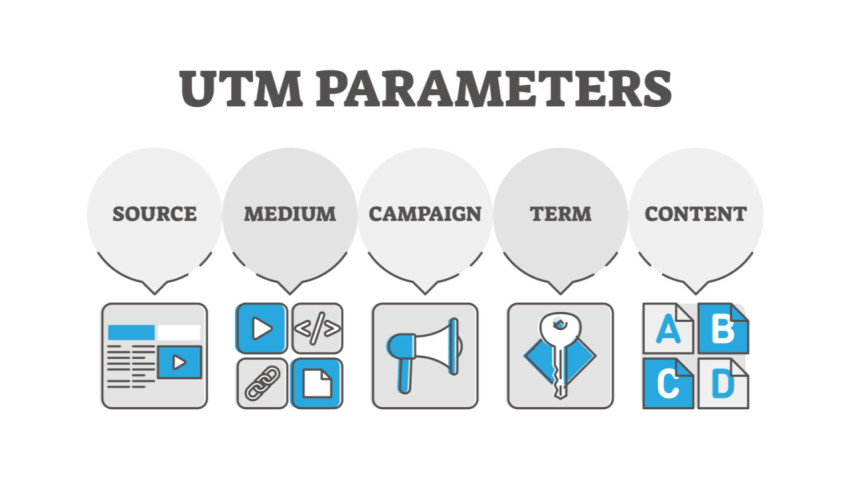
UTM parameters are tags that you add to the end of your URLs to track specific information about a marketing campaign. These tags help identify the source of traffic and provide valuable data for analysis. They consist of five components: utm_campaign, utm_medium, utm_source, utm_term (optional), and utm_content (optional).
Campaign UTM refers to the name or identifier of a specific marketing campaign. It allows you to differentiate between different campaigns and measure their individual performance within Google Analytics.
Medium represents the channel or marketing medium through which visitors arrive at your website. This could include sources such as email newsletters, social media platforms, organic search results, or paid advertisements.
UTM Source identifies where the traffic is coming from specifically. For example, if you're running ads on multiple websites or using different social media platforms like Facebook and Instagram for promotion, this parameter helps pinpoint which source is driving more traffic.
By utilizing these parameters effectively in your URLs within your various marketing efforts - whether it be email campaigns or social media posts - you can gain insights into which channels are bringing in the most engaged audience and leading to conversions.
Understanding these definitions lays the foundation for harnessing the power of UTM tracking within Google Analytics. But how exactly do we use them? Let's find out!
How to use utm, campaign utm, medium and utm source google analytics
Once you understand the importance of using UTM codes in Google Analytics, it's time to learn how to actually use them. Thankfully, it's a simple process that can greatly enhance your tracking capabilities.
To create a UTM code, you will need to include specific parameters in the URL of your campaign or marketing materials. The parameters include utm_source, utm_medium, and utm_campaign. Let's break down what each parameter means:
- Utm_source: This identifies where the traffic is coming from. It could be a specific website or platform such as Facebook or LinkedIn.
- Utm_medium: This describes the medium through which your campaign is being delivered - email, social media post, banner ad etc.
- Utm_campaign: This specifies the name of your campaign.
By including these parameters in your URLs, you can track and analyze the effectiveness of different campaigns and mediums within Google Analytics. You'll be able to see which sources are driving the most traffic and conversions for your business.
To start using UTM codes effectively with Google Analytics:
1. Identify where you want to track traffic from (utm_source).
2. Determine how you plan to deliver your campaign (utm_medium).
3. Assign a unique name for each individual campaign (utm_campaign).
With this information ready, you can then generate unique URLs by adding these parameters at the end of each link.
Using UTMs may seem like an extra step but once implemented correctly, they provide valuable insights into understanding user behavior and optimizing marketing efforts accordingly!
The benefits of using utm, campaign utm, medium and utm source google analytics
Using utm, campaign utm, medium, and utm source Google Analytics can provide numerous benefits for your online marketing campaigns. These tracking tools allow you to gather valuable data about the effectiveness of your marketing efforts and make informed decisions based on real-time insights.
One of the key advantages of using these tools is the ability to track and measure the success of specific campaigns or promotions. By assigning unique UTM parameters to different links or ads, you can easily identify which channels are driving the most traffic and conversions. This information enables you to allocate your resources more effectively by focusing on high-performing campaigns while optimizing or eliminating underperforming ones.
Another benefit is that UTM parameters help you understand user behavior across various mediums such as email, social media, and paid search. By analyzing this data in Google Analytics, you can gain insights into which channels are most effective at attracting engaged users who are more likely to convert. With this knowledge, you can tailor your marketing strategies accordingly.
In addition, using UTM tags allows for accurate attribution analysis. It helps answer questions like: Did a particular blog post drive traffic from social media? Which email campaign led to a spike in website visits? Understanding how various sources contribute to overall conversion rates empowers marketers with actionable intelligence.
Moreover, these tracking tools enable seamless integration between different platforms within Google Analytics ecosystem such as AdWords or Search Console. This integration provides a holistic view of all your digital marketing efforts in one place - making it easier than ever before to analyze cross-channel performance and optimize ROI.
Implementing UTM parameters along with campaign UTMs (e.g., "summer-sale"), mediums (e.g., "email"), and UTMs source (e.g., "newsletter") in Google Analytics unlocks powerful insights that inform decision-making process for businesses striving towards growth online.
What are utm, campaign utm, medium and utm source google analytics?
What are utm, campaign utm, medium and utm source google analytics? These terms may sound like a jumble of letters and words, but they actually hold great significance in the world of digital marketing. UTM stands for Urchin Tracking Module, which is a way to track the effectiveness of online marketing campaigns. It allows you to add unique tags to your URLs so that you can see where your website traffic is coming from.
Campaign UTM refers specifically to the tracking parameter used to identify different marketing campaigns. It helps you differentiate between different promotions or initiatives that you're running at the same time. By using campaign UTM codes, you can analyze which campaigns are driving the most traffic or conversions.
Medium tells Google Analytics what type of channel or platform brought visitors to your site. For example, it could be email, social media, organic search, etc. This information is crucial for understanding how people find your website and which channels are performing well.
UTM Source indicates exactly where your traffic is originating from within a specific medium. This could be a specific website or social media network that referred visitors to your site. It enables you to track the effectiveness of individual sources and make informed decisions about where to allocate resources.
These tools work together seamlessly within Google Analytics and provide valuable insights into your marketing efforts. Understanding how they function and utilizing them effectively can help optimize your campaigns by identifying what's working and what's not.
So next time someone mentions UTM parameters or campaign tagging with Google Analytics, don't get overwhelmed! Embrace these tools as powerful allies in tracking and improving the success of your online marketing activities.
How to use these tools
When it comes to using UTM, campaign UTM, medium, and UTM source in Google Analytics, there are a few key steps to follow. First and foremost, it's important to understand what these tools are and how they work.
UTM stands for Urchin Tracking Module and is a code that you can add to your URLs. This code helps track the effectiveness of your marketing campaigns by providing detailed information about where your traffic is coming from. The campaign UTM parameter allows you to categorize different marketing initiatives or campaigns within your overall strategy.
The medium parameter indicates the channel through which users are accessing your website or landing page. It could be email, social media, organic search, or others. The utm_source parameter specifies the specific source of traffic such as Facebook ads or Google AdWords.
To use these tools effectively in Google Analytics, start by creating unique URLs with UTM parameters for each of your marketing campaigns. Be sure to include relevant information such as the campaign name or source so that you can easily identify them later on.
Next, monitor and analyze the data provided by Google Analytics regularly. Look for patterns and trends in terms of which campaigns or sources are driving the most traffic and conversions.
Make adjustments based on the insights gained from this data analysis. If certain campaigns or mediums aren't performing as well as expected, consider tweaking them or reallocating resources towards more successful ones.
By mastering these tools in Google Analytics and consistently monitoring their performance metrics like click-through rates (CTR) conversion rates (CR), you can optimize your marketing efforts for better results!
Conclusion
Conclusion
In today's digital age, data is king. And when it comes to measuring the success of your online campaigns, mastering UTM parameters and Google Analytics is essential. By using campaign UTM, medium, and UTM source in Google Analytics, you can gain valuable insights into the effectiveness of your marketing efforts.
UTM parameters allow you to track the performance of specific campaigns across different channels. With campaign UTM tags such as utm_campaign, utm_medium, and utm_source, you can easily identify which marketing initiatives are driving the most traffic and conversions to your website.
By utilizing these tools effectively, you can make data-driven decisions that optimize your marketing strategies. You'll have a clearer understanding of what's working and what isn't so that you can allocate resources more efficiently.
Furthermore, by tracking individual campaigns with unique UTM tags like utm_content or utm_term in Google Analytics, you can compare their performance side by side. This will help you determine which messaging or keywords resonate best with your audience.
The benefits of mastering campaign UTM parameters go beyond just tracking performance. They also provide invaluable insights for future planning and optimization. By analyzing how different mediums or sources contribute to conversions or goal completions on your website through Google Analytics reports like Acquisition Overview or Campaigns report., You'll be able to refine your targeting strategies for better results next time around.
In conclusion (as an AI language model), it is evident that understanding and leveraging campaign UTM parameters along with medium and source in Google Analytics should be a top priority for marketers who want to measure their online success accurately. Don't underestimate the power of these tools; they hold the key to unlocking valuable data that will propel your marketing efforts forward.