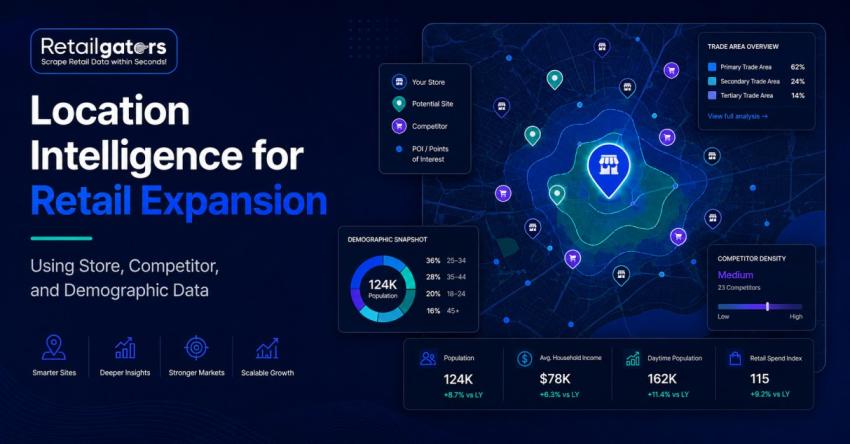
Retail expansion decisions can look straightforward on a map. A city has strong population growth, household income appears attractive, and there seems to be enough distance from existing stores.
Yet those signals alone rarely tell the full story.
A market may have excellent demographics but heavy competition. Another may show limited competition because demand is weak. A third may already generate strong ecommerce sales, suggesting physical expansion could work despite modest population numbers.
This is where retail location intelligence becomes valuable.
By combining store locations, competitor footprints, demographic profiles, POI data, ecommerce demand, and internal performance data, retailers can identify expansion opportunities with greater confidence.
Which markets offer enough demand, the right customer profile, manageable competition, and limited cannibalization risk?
What Is Retail Location Intelligence?
Retail location intelligence uses geographic and business data to understand where stores should open, relocate, expand, or close.
It brings together several data sources, including:
- Existing store locations
- competitor store locations
- Demographics
- Points of interest
- Customer locations
- Ecommerce demand
- Traffic or mobility signals
- Historical store performance
A store-location dataset tells you where businesses operate.
Location intelligence explains what those locations mean for expansion strategy.
For enterprise retailers, that distinction matters because site selection isn't just a real estate decision. It affects merchandising, customer acquisition, logistics, market coverage, and long-term profitability.
Why Traditional Store Expansion Analysis Can Miss Opportunities
Many expansion teams still evaluate markets using demographic reports, broker recommendations, traffic estimates, and nearby competitor counts.
Those inputs remain useful, but they can become misleading when analyzed separately.
Strong Demographics Don't Guarantee Store Success
Two trade areas may have similar population and household income but perform very differently.
One might have:
Better accessibility
Higher commercial activity
More complementary retailers
Stronger ecommerce demand
A customer profile closer to your best-performing stores
The other may be difficult to access or already overserved by competitors.
Good store expansion analysis looks beyond headline demographic numbers.
Low Competition Isn't Always Positive
A market with few competing stores can look attractive.
But why haven't competitors entered?
Sometimes it represents true white space. In other cases, category demand simply isn't strong enough.
Competition should therefore be interpreted alongside customer demand, demographics, POIs, and existing market activity.
The Core Data Needed for Retail Expansion
Data Type
Store location data
Competitor data
Demographics
POI data
Ecommerce demand
Customer data
Store performance
What It Helps Answer
Where are our current stores?
How crowded is the market?
Does the population match our target customer?
What businesses and destinations surround the area?
Where are customers already buying online?
Where does current demand originate?
What characteristics define successful locations?
The strongest insights appear when these datasets are connected rather than reviewed independently.
1. Start With Accurate Store Location Data
A reliable store location dataset is the foundation of expansion analysis.
Useful fields often include:
Store name
Address
City
State
Postal code
Latitude and longitude
Store format
Opening hours
Store status
Opening or closing date
Services or amenities
Last verified date
Coordinates are particularly important because they allow analysts to calculate distances, build trade areas, map nearby competitors, and connect demographic or POI information.
Store format should also be preserved.
A flagship store, outlet, mall location, neighborhood format, and warehouse store may serve very different customer segments. Treating them as identical can distort the analysis.
2. Map Competitor Store Locations
Understanding competitor store locations helps retailers see where category activity is concentrated.
Competitive analysis can reveal:
Store density
Distance to nearest competitor
Market saturation
Regional expansion patterns
New store openings
Store closures
Potential white-space areas
However, simple competitor counting isn't enough.
Five small competitors don't necessarily create the same pressure as one dominant chain with strong local penetration.
Retailers should classify competitors by relevance, store format, and market strength.
Look for Competitive Patterns
Historical competitor data can reveal useful signals.
For example, several retailers opening locations in the same suburban corridor may indicate growing commercial activity.
Likewise, repeated store closures in a market deserve investigation before expansion capital is committed.
This turns competitive intelligence into an input for long-term network planning.
3. Add Demographic Data
Demographics help determine whether the local population resembles the retailer's target audience.
Common fields include:
Population
Household income
Population growth
Age distribution
Household size
Employment
Education
Homeownership
Population density
The right variables depend on the retail concept.
A premium furniture retailer may prioritize household income and homeownership. A convenience concept may care more about population density, commuter traffic, and daytime population.
Instead of collecting every available demographic variable, expansion teams should focus on the characteristics that correlate with successful existing stores.
4. Use POI Data to Understand the Area
POI data for retail provides information about nearby businesses and destinations.
Relevant POIs may include:
Shopping centers
Restaurants
Gyms
Offices
Hotels
Schools
Hospitals
Transit stations
Grocery stores
Complementary retailers
Competitor locations
This gives expansion teams a better view of the local commercial ecosystem.
For example, an athletic apparel brand may find a location more attractive when it sits near gyms, sports facilities, premium grocery stores, and other lifestyle retailers.
Those surrounding businesses can indicate customer behavior that demographic data alone won't capture.
5. Connect Ecommerce Demand With Physical Expansion
For omnichannel retailers, ecommerce data can provide another useful location signal.
Suppose a metropolitan area generates strong online orders despite having limited physical store coverage.
That doesn't automatically justify opening a store, but it creates a valuable expansion hypothesis.
Retailers can compare:
Ecommerce orders by ZIP code
Customer concentration
Category demand
Repeat purchase behavior
Competitor density
Distance from existing stores
Demographic fit
This approach connects physical expansion with retail analytics rather than treating ecommerce and stores as separate channels.
It can be especially useful for digital-first brands considering their first physical locations.
A Practical Retail Location Intelligence Workflow
Enterprise teams need a repeatable process rather than one-off map analysis.
Step 1: Define the Business Question
Avoid starting with:
“Where should we open next?”
Use a more specific question such as:
“Which suburban markets could support a new location without significantly cannibalizing existing stores?”
Clear questions lead to better scoring models.
Step 2: Collect Store and Competitor Data
Build structured datasets covering:
Existing locations
Direct competitors
Indirect competitors
Relevant POIs
Complementary retailers
Retail data platforms such as RetailGators can support recurring collection of store and competitor data for enterprise retail data pipelines.
Step 3: Normalize the Data
Before analysis, standardize:
Brand names
Addresses
Store formats
Categories
Geographic fields
Store status
This step is often underestimated.
One retailer may appear under several naming variations, causing competitor counts to become inaccurate.
Strong retail data quality prevents those errors from reaching the final model.
Step 4: Remove Duplicates and Closed Stores
Location information may appear across store locators, directories, shopping-center websites, and third-party listings.
Duplicate records can make markets look more saturated than they are.
Closed stores create the same problem.
A good data pipeline should track whether each location is active and when it was last verified.
Step 5: Define Trade Areas
One fixed radius shouldn't be used across every retail concept.
Depending on the business, trade areas may use:
Distance
Drive time
ZIP codes
Customer-origin data
Census areas
Custom geographic boundaries
A grocery store may have a relatively local catchment area, while a furniture retailer may attract customers from much farther away.
Step 6: Compare Candidates With Successful Stores
One of the most useful techniques is comparing potential markets with existing high-performing locations.
This helps decision-makers understand why a candidate market deserves further investigation.
Building a Store Expansion Scoring Model
When evaluating hundreds of markets, expansion teams need a consistent scoring framework.
An example might include:
Factor
Example Weight
Demographic fit
25%
Market demand
20%
Competitive environment
15%
Ecommerce demand
15%
POI ecosystem
10%
Accessibility
10%
Cannibalization risk
5%
These percentages should change depending on the business.
A grocery chain and luxury retailer shouldn't use the same model.
The goal isn't to produce a perfect score. It's to prioritize markets that deserve deeper financial, operational, and real estate analysis.
Common Retail Location Intelligence Mistakes
Assuming No Competition Means Opportunity
Low competition may indicate white space, but it can also indicate weak category demand.
Using Outdated Store Data
Competitor footprints change continuously. Stale locations can distort market-saturation calculations.
Ignoring Store Format
Different formats serve different trade areas and customer profiles.
Overlooking Cannibalization
A promising new location may simply shift revenue away from an existing store.
Skipping Data Normalization
Incorrect coordinates, duplicate stores, inconsistent brand names, and outdated operating status weaken the entire model.
This is why web data accuracy and ecommerce data validation should be part of the expansion workflow rather than treated as technical housekeeping.
How AI Can Improve Retail Location Analysis
AI and machine-learning models can help retailers analyze larger combinations of geographic and commercial signals.
Instead of looking only at demographics and nearby competitors, models can compare:
Store performance
Customer behavior
Ecommerce demand
Competitor networks
POI density
Demographics
Geographic characteristics
Market growth
This can help rank candidate locations and uncover patterns that analysts may not notice manually.
Still, better modeling doesn't fix poor source data.
If competitor locations are outdated or coordinates are inaccurate, the model simply produces a more sophisticated version of the wrong answer.
Good decision-grade ecommerce data remains the foundation.
Conclusion
Retail expansion decisions become stronger when teams stop evaluating locations through isolated data points.
Population matters. So does income. Competition matters too. But none of those signals should decide a site on their own.
Effective retail location intelligence connects store footprints, competitor activity, demographic fit, POIs, ecommerce demand, trade areas, and internal store performance into one decision framework.
Start with accurate store location datasets. Map competitors carefully. Add demographic and POI data for retail. Validate and normalize the information. Then compare potential markets against the characteristics of successful existing stores.
Platforms such as RetailGators can support the collection and monitoring of retail location and competitor data, while the retailer's own analytics team applies the business logic that determines what makes a market attractive.
The goal isn't to automate the final expansion decision.
It's to give real estate, ecommerce, finance, and retail intelligence teams enough reliable context to focus their time and capital on the markets with the strongest business case.